'2.2.3'Crash Course: Python II
pandas
Brendan Chapuis
March 10, 2027
Getting Started
Where We Are
Last class: installing Python, environments, packages, and the basics of the language.
Today: pandas, the main package for working with data in Python.
pandasplays the role ofreadr+dplyr+tidyrin R- You already know what you want to do with data
- Today is mostly learning new names for the same verbs
Throughout, the R version is shown next to the Python version, on the same data.
Installing and Importing
Install into your project’s environment (the .venv from last class):
Then import, using the standard aliases:
These slides were rendered with the version above. pandas 3.0 (released 2026) changed a few defaults; the slides point them out where they matter.
Our Data: JOLTS, New England
The same BLS JOLTS data as Assignments 3 and 5: annual averages of the monthly job openings and quits rates (percent), 2022–2023.
A DataFrame is built from a dictionary: keys are column names, values are the columns.
Series and DataFrames
A First Look
A First Look: Shape and Columns
Note: shape and columns are attributes (no parentheses); head() is a method.
Column Types
<class 'pandas.core.frame.DataFrame'>
RangeIndex: 12 entries, 0 to 11
Data columns (total 4 columns):
 #   Column    Non-Null Count  Dtype
---  ------    --------------  -----
 0   state     12 non-null     object
 1   year      12 non-null     int64
 2   openings  12 non-null     float64
 3   quits     12 non-null     float64
dtypes: float64(2), int64(1), object(1)
memory usage: 516.0+ bytes
Strings show up as object in pandas 2. In pandas 3 they get a dedicated str type.
Summaries
describe() summarizes every numeric column, like summary() in R.
Series
Each column of a DataFrame is a Series: a vector with labels.
Series Methods
Series have their own methods:
Vectorized Operations
Arithmetic on a Series works element by element, like vectors in R.
0     2.95
1     2.72
2     3.60
3     2.81
4     2.77
5     2.70
6     2.74
7     2.70
8     4.00
9     2.61
10    2.57
11    2.50
dtype: float64
No loops needed, and much faster than one.
The Index
The bold numbers on the left are the index: a label for each row.
- By default it is
0, 1, 2, ... - Filtering and sorting keep the original labels
- Some operations (
groupby,pivot) move columns into the index
Tibbles and data.tables have no row names, so this is the biggest conceptual difference from R.
Reading and Writing Data
Reading a CSV
pd.read_csv() reads delimited files. The JOLTS files are tab-delimited:
| industry_code | state_code | dataelement_code | |
|---|---|---|---|
| 0 | 0 | 00 | HI |
| 1 | 0 | 00 | HI |
| 2 | 0 | 00 | JO |
Something went wrong: the industry code in the file is "000000", not 0.
Telling pandas the Types
pandas guessed industry_code was an integer and dropped the leading zeros. (state_code survived only because a few codes, like "NE", contain letters.)
Use dtype= to set column types yourself:
Telling pandas the Types: the R Version
In R, you set column types with col_types:
Same issue you met with industry_code and fread() in Assignment 5.
Writing a CSV
- Reading is a function (
pd.read_csv), writing is a method (df.to_csv) - Use
index=False, or the index is written as an extra unnamed column
Other formats follow the same pattern: pd.read_excel(), pd.read_stata(), df.to_stata(), …
Parquet
Parquet is a compressed, column-based file format that stores column types.
- Much smaller and faster than CSV for large data
- Types survive the round trip (no leading-zero problems)
- Readable from R with the
arrowpackage:arrow::read_parquet()
Needs the pyarrow package installed.
Selecting and Filtering
Selecting Columns
One Bracket or Two?
df["col"]with a string gives a Seriesdf[["col"]]with a list gives a DataFrame
Similar to df$col versus df[, "col", drop = FALSE] in base R.
Filtering Rows with a Boolean Mask
A comparison on a Series gives a Series of True/False:
Filtering Rows with a Boolean Mask: Keeping Rows
Put that mask inside [ ] to keep the True rows:
Combining Conditions
Use & (and), | (or), ~ (not), with parentheses around each condition.
Python’s and / or do not work on Series. And without parentheses, & binds before ==, so you get an error.
Matching a Set of Values
.isin() is the pandas version of %in%.
.query()
.query() takes the condition as a string, and reads a lot like filter().
.loc: Select by Label
df.loc[rows, columns] selects rows and columns by label (or a boolean mask).
.loc: Label Slices
Label slices include the end point.
.iloc: Select by Position
df.iloc[rows, columns] selects by integer position, like df[1:3, 1:2] in R.
Positions start at 0, and slices exclude the end point.
.loc vs .iloc
.loc |
.iloc |
|
|---|---|---|
| Selects by | labels, boolean masks | integer positions |
[0:2] gives |
labels 0, 1, and 2 | positions 0 and 1 |
| Typical use | filtering, assigning values | “first 5 rows”, “last column” |
Rules of thumb:
- Use
.locwhen you want to change values:df.loc[mask, "col"] = value - After filtering or sorting, labels and positions no longer match, so be deliberate about which one you mean
Sorting
Sort by several columns with lists:
Notice the index labels travel with their rows.
Creating Columns
Assigning a New Column
The direct way changes the DataFrame itself:
| state | year | openings | quits | ratio | |
|---|---|---|---|---|---|
| 0 | CT | 2022 | 6.5 | 2.2 | 2.954545 |
| 1 | ME | 2022 | 6.8 | 2.5 | 2.720000 |
| 2 | MA | 2022 | 7.2 | 2.0 | 3.600000 |
Like df$ratio <- df$openings / df$quits in base R.
.assign(): the mutate() of pandas
.assign() returns a new DataFrame and leaves the original alone.
Column names are given without quotes, as keyword arguments.
.assign() with lambda
A lambda is a small unnamed function: lambda d: d["quits"] * 2 means “given d, return d["quits"] * 2”.
Inside .assign(), the lambda receives the DataFrame at that step:
This lets later columns use earlier ones, and is what makes method chains work.
Conditional Columns and Renaming
np.where() is a vectorized if-else:
Group By and Aggregate
Group and Summarize
The result is a Series, and the group (year) has moved into the index.
Named Aggregation
.agg() with new_name=("column", "function") is the closest match to summarize():
Keeping the Groups as Columns
Use as_index=False (or .reset_index() afterward) to get an ordinary DataFrame back:
| year | quits_avg | openings_avg | |
|---|---|---|---|
| 0 | 2022 | 2.433333 | 7.05 |
| 1 | 2023 | 2.133333 | 5.95 |
Group by several columns with a list: groupby(["state", "year"]).
Quick counts: df["state"].value_counts() is like count(df, state).
Group and Mutate: .transform()
.transform() returns one value per row, like group_by() + mutate().
Demeaning within a group is exactly what a fixed effect does in fixest.
Method Chaining
Each method returns a new DataFrame, so you can call the next method on it, like |>.
Wrap the chain in parentheses so you can put one step per line.
Why Chain?
Without chaining, you either nest calls or create many temporary objects:
Chains read top to bottom, like a pipe.
- If a chain gets long, break it into named steps
- To debug a chain, comment out the later lines and run it step by step
Merging and Concatenating
A Second Table
A lookup table with state names and 2023 population (millions). Vermont is missing; New York is extra.
merge()
One method covers every join type through how=:
dplyr |
pandas |
|---|---|
inner_join(x, y, by = "state") |
x.merge(y, on="state", how="inner") |
left_join(x, y, by = "state") |
x.merge(y, on="state", how="left") |
right_join(x, y, by = "state") |
x.merge(y, on="state", how="right") |
full_join(x, y, by = "state") |
x.merge(y, on="state", how="outer") |
The default is how="inner", which silently drops unmatched rows. Always write how= explicitly.
Left Merge
| state | year | openings | quits | name | pop | |
|---|---|---|---|---|---|---|
| 6 | CT | 2023 | 5.2 | 1.9 | Connecticut | 3.6 |
| 7 | ME | 2023 | 6.2 | 2.3 | Maine | 1.4 |
| 8 | MA | 2023 | 6.4 | 1.6 | Massachusetts | 7.0 |
| 9 | NH | 2023 | 6.0 | 2.3 | New Hampshire | 1.4 |
| 10 | RI | 2023 | 5.9 | 2.3 | Rhode Island | 1.1 |
| 11 | VT | 2023 | 6.0 | 2.4 | NaN | NaN |
Vermont is kept, with NaN (missing) for name and pop. New York is dropped.
Inner and Outer
- Inner: 12 rows minus the 2 Vermont rows = 10
- Outer: all 12 rows, plus 1 row for New York = 13
Checking the row count after every merge is a good habit.
indicator=True: Where Did Rows Come From?
_merge
both          10
left_only      2
right_only     1
Name: count, dtype: int64validate=: Check the Relationship
Each state-year in jolts should match at most one row of regions. Say so:
If regions accidentally has a duplicate state, the merge stops with an error instead of duplicating rows:
Different Key Names
When the key has different names in the two tables, use left_on= and right_on=:
Merging on several keys: on=["state", "year"].
Concatenating
pd.concat() stacks DataFrames, like bind_rows().
pd.concatis a function that takes a list of DataFrames- Columns are matched by name; missing columns are filled with
NaN - Without
ignore_index=True, the old index labels are kept, duplicates and all
Reshaping
Tidy Data, Again
Same rules as in R: each variable a column, each observation a row.
tidyr |
pandas |
|---|---|
pivot_longer() |
.melt() |
pivot_wider() |
.pivot() |
pivot_wider(values_fn = mean) |
.pivot_table(aggfunc="mean") |
Wide to Long: .melt()
id_vars are the columns to keep as identifiers; everything in value_vars gets stacked.
Long to Wide: .pivot()
.pivot() puts the index= columns into the index, so finish with .reset_index().
.pivot_table(): Pivot and Aggregate
.pivot() fails if an index/column pair appears more than once. .pivot_table() aggregates the duplicates instead:
Here: the New England average of each rate, by year.
Missing Values, Types, and Dates
Missing Values
pandas marks missing values as NaN (or None / pd.NA).
| R | pandas |
|---|---|
is.na(x) |
x.isna() |
drop_na(df, pop) |
df.dropna(subset=["pop"]) |
replace_na(x, 0) |
x.fillna(0) |
Missing Values Are Skipped by Default
In R, mean(c(1, NA, 3)) is NA unless you add na.rm = TRUE.
pandas silently drops missing values in mean(), sum(), and groupby() aggregations. Count your missing values before you summarize.
Types: Checking and Converting
0    1.5
1    2.0
2    NaN
dtype: float64
pd.to_numeric(x, errors="coerce")turns bad values intoNaN, likeas.numeric()df["col"].astype(str),.astype(int),.astype(float)convert types- An integer column that gains a missing value becomes
float
Dates
JOLTS stores dates as a year and a period like "M03". Build a real date:
Date columns have a .dt accessor: monthly["date"].dt.month, .dt.year, …
Common Pitfalls
Pitfall 1: Index Alignment
Operations between Series line up by index label, not by position.
MA    12.0
NH     NaN
RI     NaN
VT    23.0
dtype: float64
R would add these position by position (11, 22, 33) and ignore the names.
Pitfall 1: Index Alignment
This also happens when you assign a Series as a column:
| state | year | openings | quits | q_sorted | |
|---|---|---|---|---|---|
| 0 | CT | 2022 | 6.5 | 2.2 | 2.2 |
| 1 | ME | 2022 | 6.8 | 2.5 | 2.5 |
| 2 | MA | 2022 | 7.2 | 2.0 | 2.0 |
The sorted values were put back in their original rows, so q_sorted equals quits.
To assign by position, drop the labels: s.to_numpy().
Pitfall 2: Chained Indexing
Two sets of brackets in a row, then an assignment:
[2.2, 2.5, 2.0, 2.6, 2.6, 2.7, 1.9, 2.3]Nothing changed. The first [ ] made a new DataFrame, and the 0s went into it.
Pitfall 3: Views and Copies
pandas 2 warns because it can’t tell whether you meant to change jolts too.
pandas 3 turns on Copy-on-Write: anything you derive from a DataFrame behaves like a separate copy.
- Changing
recentnever changesjolts - Chained assignment like the last slide never works
- The warning is gone
Either way, if you plan to modify a subset, make the copy explicit: recent = jolts[...].copy(), or use .assign().
Copies: pandas vs data.table
Recall data.table’s := modifies by reference:
pandas with Copy-on-Write goes the other way:
- New objects from filtering, selecting, or methods act like copies
- But plain assignment
df2 = dfstill gives two names for one object, like indata.table df["col"] = ...anddf.loc[...] = ...modifydfin place
Prefer methods that return new DataFrames (.assign(), .query(), …). Skip the inplace=True arguments you will see online.
Other Gotchas
and/orinstead of&/|in masks, or missing parentheses.loc[0:2]includes 2,.iloc[0:2]does notdf.quitsworks as a shortcut fordf["quits"], but not for names with spaces, or names likecountthat are also methods- Methods return a new object:
jolts.sort_values("quits")alone does not sortjolts groupbydrops rows where the group key is missing, unless you passdropna=Falserenameis{old: new};mutateandrenamein R arenew = old
Plotting and Workflow
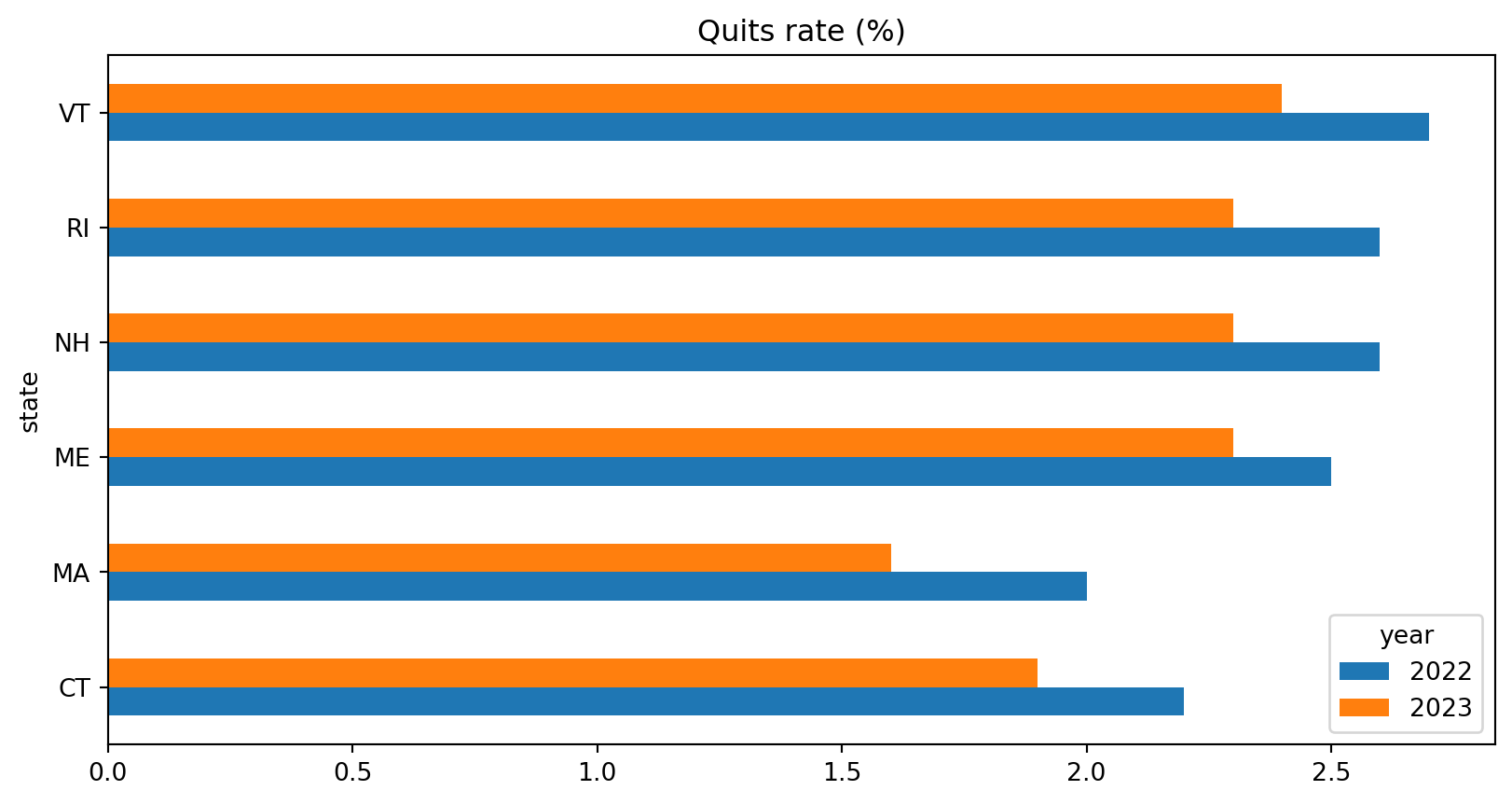
A Quick Plot
pandas plots with matplotlib behind the scenes.
Saving a Plot
Save it with the figure’s savefig method:
For anything more involved, see seaborn or plotnine (a ggplot2 clone).
dplyr to pandas
| tidyverse | pandas |
|---|---|
read_csv(), write_csv() |
pd.read_csv(), df.to_csv(index=False) |
select(a, b), select(-a) |
df[["a", "b"]], df.drop(columns=["a"]) |
filter(x > 1) |
df[df["x"] > 1], df.query("x > 1") |
mutate(y = x * 2) |
df.assign(y=lambda d: d["x"] * 2) |
arrange(desc(x)) |
df.sort_values("x", ascending=False) |
rename(new = old) |
df.rename(columns={"old": "new"}) |
dplyr to pandas: Groups, Joins, Reshaping
| tidyverse | pandas |
|---|---|
group_by(g) \|> summarize(m = mean(x)) |
df.groupby("g", as_index=False).agg(m=("x", "mean")) |
group_by(g) \|> mutate(m = mean(x)) |
df.groupby("g")["x"].transform("mean") |
count(g), distinct() |
df["g"].value_counts(), df.drop_duplicates() |
left_join(x, y, by = "k") |
x.merge(y, on="k", how="left") |
bind_rows(x, y) |
pd.concat([x, y], ignore_index=True) |
pivot_longer(), pivot_wider() |
df.melt(), df.pivot() / df.pivot_table() |
if_else(), is.na() |
np.where(), .isna() |
\|> |
method chaining inside ( ) |
Notebooks or Scripts?
Last class introduced Jupyter notebooks. When should you use one?
Notebooks (.ipynb) are good for:
- Exploring a new dataset
- Sharing results with the output included
- Teaching and short demonstrations
Notebooks or Scripts? (Scripts)
Scripts (.py) are better for:
- Your research pipeline: anything that must run start to finish, again and again
- Code that others will run, test, or review in git (notebook diffs are a mess)
- Functions you want to import and reuse
The Middle Ground
In VS Code, a .py file with # %% markers gets runnable cells:
clean_jolts.py
- Run one cell at a time in the Interactive Window, like a notebook
- The file is still a plain script: clean git diffs, and
python clean_jolts.pyruns it all
This is the Python version of running R scripts line by line in the terminal.
Class Activity
Class Activity (~15 minutes)
Redo a tidyverse-style wrangling task in pandas, using the JOLTS files from Assignment 5.
- Read
jt.series.txt,jt.state.txt, andjt.data.0.Current.txt(starter code on the next slide) - Merge the three tables, checking the row counts
- Filter to
seasonal == "S",industry_code == "000000",ratelevel_code == "R",dataelement_code == "QU", and years 2019–2023 - Group and summarize: the average quits rate by state and year
- Reshape to wide: one row per state, one column per year
- Add a column with the change from 2019 to 2023, and sort by it. Which five states saw the largest increase?
Starter Code
The BLS files pad their columns with spaces, so strip them when reading:
import pandas as pd

def read_bls(file):
    df = pd.read_csv("raw-data/" + file, sep="\t", dtype=str)
    df.columns = df.columns.str.strip()
    return df.apply(lambda col: col.str.strip())

series = read_bls("jt.series.txt")
states = read_bls("jt.state.txt")
current = read_bls("jt.data.0.Current.txt")

current["year"] = current["year"].astype(int)
current["value"] = pd.to_numeric(current["value"])
Everything is read as a string (dtype=str), so codes keep their leading zeros. Then convert year and value.
One Solution
quits = (
    current
    .merge(series, on="series_id", how="inner", validate="many_to_one")
    .merge(states, on="state_code", how="left", validate="many_to_one")
    .query("seasonal == 'S' and industry_code == '000000' "
           "and ratelevel_code == 'R' and dataelement_code == 'QU' "
           "and 2019 <= year <= 2023")
    .groupby(["state_text", "year"], as_index=False)
    .agg(quits=("value", "mean"))
    .pivot(index="state_text", columns="year", values="quits")
    .reset_index()
    .assign(change=lambda d: d[2023] - d[2019])
    .sort_values("change", ascending=False)
)
quits.head()- After the pivot, the year columns are named by the integers
2019, …, so used[2023], notd["2023"] - The result has 56 rows: the states, DC, four Census regions, and the US total
- Write the same task with
dplyrand compare: the steps line up one for one
Summary
Summary
- A
pandasDataFrame is a set of Series with a shared index - Read with
pd.read_csv()(setdtype=for codes), write withdf.to_csv(index=False) - Select with
[[ ]], filter with masks or.query(), use.locfor labels and.ilocfor positions .assign(),.sort_values(),.groupby().agg(), and.transform()cover most ofdplyr.merge()with explicithow=,validate=, andindicator=;pd.concat()to stack.melt()and.pivot()/.pivot_table()reshape- Watch out for index alignment, chained indexing, and silently skipped missing values
Live Coding Example
Live Coding Example
- Create a new project folder with a
.venvand installpandas - Read the JOLTS files in a
.pyscript with# %%cells - Work through the class activity in the Interactive Window
- Compare each step with the
dplyrversion - Save the result to CSV and a plot to PNG