R Data Wrangling: data.table & Speed
Fast data wrangling, and making R code faster
March 3, 2027
data.table
data.table
Is another package focused on data science.
It’s goals:
- speed
- brevity
- no dependencies
In contrast to the tidyverse which is focused on readability.
Installing data.table
Again, we use renv to install data.table for any project we are using.
Then we can load the package,
data.table objects
data.tables are a new object to replace data.frame.
Similar to tibbles, they have nicer default printing
               x            y
1   -0.743073040 -0.483236181
2    0.821457624 -0.375938784
3   -1.008600423 -0.423244503
4   -0.129724698 -0.772954852
5    1.124437470 -0.605422486
6   -1.129178565  0.152228860
7    0.471489152 -0.024775851
8    0.695513791 -2.106954375
9   -0.405039279 -0.092259079
10  -0.546153620 -1.511010544
11  -0.286182242 -1.131763832
12   0.200718988 -1.668402929
13   0.013949668  0.962533030
14   0.480261831 -0.300540251
15   0.072494611  0.711228067
16   0.751542088  2.111444152
17  -0.630172230  0.105110178
18   0.370970750  0.464407270
19   0.718087217 -0.638171854
20   0.058598522 -0.159392655
21  -0.072365398  0.266731166
22   1.044532790 -0.195683150
23  -0.778796546 -0.242187184
24   0.881467233  0.721771104
25  -0.312485854  0.038542893
26  -1.198045701 -0.252114145
27  -1.401219601  1.013535228
28   0.470552428  1.189427804
29   0.533383943 -0.942555503
30  -0.657844012 -0.068179070
31  -0.567962360 -1.566841717
32   0.483543494 -0.756025208
33   0.073906393 -0.071010218
34   1.100292108  1.787798140
35  -1.709609022  0.057594356
36   0.363033956 -1.213351470
37   1.408014343 -0.911761159
38   0.141750728  0.407713523
39   0.467339210 -0.546379339
40   0.479379838 -1.760865939
41  -0.333294793 -0.453391359
42   0.162959532  0.177651937
43   0.713218591  1.681724586
44  -0.900678710 -1.037727753
45  -0.865996819 -0.291571182
46   0.140687237 -0.694699047
47  -2.146766675  1.265057666
48   3.070679889 -1.062061668
49  -0.573817731  2.630681432
50  -0.262589656  0.671497983
51  -0.057138818  0.498823445
52  -0.828487161  0.650524335
53   1.847782370 -0.212497875
54  -0.609547679 -1.590190930
55   0.150869295  1.633435927
56   1.272210846  1.594740521
57  -0.761422593  1.327555238
58  -1.473881937 -0.409333992
59   1.338831313  0.917301809
60   0.496948147 -0.630755859
61  -1.986958154  0.406734642
62  -0.727116004 -0.341707908
63   0.487484487 -0.831282347
64  -0.822059915  0.969579771
65  -0.471700265  2.532789383
66  -0.691127249 -0.244708026
67  -1.357606973  0.937372745
68   0.445164871 -0.342671019
69  -0.995316028  1.106515776
70  -0.097101330  1.240751059
71  -1.186261737 -0.091758017
72  -0.465514384  1.363263529
73   0.473298446  1.064593716
74  -0.557507105  1.010971034
75   0.277455404 -0.537380460
76   0.074247257  1.229980735
77  -2.486052837 -0.226644327
78   1.346876879 -0.246022158
79  -1.482406714 -0.814647404
80   0.619108258  0.923381468
81  -0.169213988  0.254560666
82  -0.672567731  0.202339789
83   0.655582563  0.891049459
84   0.735316908  0.681487343
85  -0.218776440  0.977282992
86   1.276010101 -0.014877939
87  -1.502469738  0.800169478
88   0.841715411  1.331400841
89   0.392513028  0.049875580
90  -0.059606137  0.709735801
91   0.726615464  0.312640530
92  -2.266940788 -0.053544391
93   0.848115067  0.252471268
94  -0.493498694  0.435780220
95   0.780225532  0.446874292
96   0.817980992  0.563095547
97  -1.639337463 -2.025014453
98   1.067960391 -1.299235107
99   0.078921703  0.071240655
100 -0.446062153 -0.497232987
101  2.277833219  0.586019683
102  0.126416211  0.305065418
103  0.671675665  0.941291904
104 -0.843811452  0.296481354
105  0.380181811 -1.047483240
106  0.661782981  1.592213971
107 -2.656912738  0.929624577
108 -1.269381849  0.312333099
109 -0.236382044  0.578467775
110 -0.306059908  1.003592017
111 -0.042141194 -0.937040110
112 -1.154914697 -0.357065738
113  0.617052513  0.266684596
114 -0.823220312  1.140170262
115  0.756701272  0.228994375
116  0.136540157 -0.281807668
117  0.168844442 -0.821620645
118  1.528899959  0.379577662
119  0.161670933  0.512792254
120 -0.970827404 -0.965507556
121 -0.006436245  0.701901516
122  2.297486215  0.100027047
123  0.595969458 -0.305800824
124 -0.813974325 -0.753255080
125 -0.924130988 -0.623108098
126 -1.208404431 -2.309478175
127  0.452986853 -0.909130885
128 -0.798365712 -0.627643446
129 -0.365093408 -0.199531471
130  1.129721523 -0.033252421
131 -0.325663773  0.058517763
132  1.038884628 -0.319746833
133  0.924888853  0.244172877
134  0.813790148  0.796091683
135  0.722023536  0.914248509
136 -1.018582204  1.956890601
137 -0.256472706  0.225915600
138 -0.920612188 -0.070669213
139  0.055101786 -0.254581448
140 -0.548250891  0.543802329
141 -0.748104883 -0.600364065
142 -0.266449230  0.511508645
143 -0.134660544 -1.303144576
144  0.210818777  0.421271842
145 -0.042573110  0.705596160
146 -1.299172450  0.004499206
147 -1.613950018 -1.616949950
148 -1.119324572 -0.010175668
149  0.003595383  0.140762205
150  0.035638656  1.769667954
151  0.676237040  0.872613408
152  1.291970481  0.329817217
153 -0.040351697  0.109516068
154  0.403055342 -0.643160927
155  1.780682660 -0.554266769
156 -0.535903097  0.133570759
157 -1.574662990 -0.350465516
158  0.864134617  0.495705397
159 -0.679603552 -1.121409503
160 -0.681522890  0.694924631
161  1.146417242 -0.052409295
162  1.714009085 -0.697847502
163 -0.440963094  1.356393624
164 -0.410870291  0.819450372
165 -0.505183210  0.258668172
166 -0.619576077 -1.386167689
167 -1.130085192 -0.807490187
168  0.253248714 -0.245350664
169 -2.493086088 -0.293611449
170 -0.352685374  1.276748253
171  1.926090719 -1.480940043
172 -0.867703539  0.338243005
173  0.333126435  0.256502361
174  0.742096754 -0.005409844
175  0.679855680 -0.731142557
176  0.076976354  1.268752153
177 -0.454527269 -0.482821586
178  1.253306553 -0.526845260
179 -0.421677150 -0.134379181
180  0.569281916 -0.513874953
181 -0.259253802  1.462234335
182 -0.883025570  1.033823657
183  0.152075821  1.157355810
184  0.262427718 -0.572681691
185 -2.345272567 -1.953036858
186  0.775480702 -0.163613406
187  0.455839863 -0.923868998
188 -0.349128010 -0.153254004
189  0.339358497 -0.260048988
190  0.371265528 -1.741718092
191 -0.679179613  0.945145452
192  0.860631883 -0.186824637
193 -0.222135070  0.150807692
194 -1.473289350  1.233812821
195  0.493684640  0.161468757
196 -1.860627205  0.278445214
197 -0.068102284  0.479621753
198  1.384825609  1.430238006
199  0.003001656 -0.756726499
200 0.035410935 -1.295603233 x y
<num> <num>
1: -2.07505194 0.23224994
2: -0.83201133 0.78398680
3: 0.03720798 0.33890957
4: 0.92235917 -2.01009647
5: 0.48943977 -0.59653719
---
196: 0.19509207 1.86024586
197: -1.29534289 -0.55700527
198: -1.12647894 0.85696106
199: 0.62186623 0.03443505
200: -0.13330779 -0.73146087data.table square brackets
Remember, from base R, than we can subset vectors, matrices, and data.frames using [i,j].
data.table square brackets
data.table takes square brackets a huge step further, by allowing
- filtering in the ‘i’ place
- new variable declaration in the ‘j’ place
We will look at each of these in turn.
data.table filtering
       a     b
   <num> <num>
1: -0.20   0.5
2:  0.10   0.0
3:  0.25  -0.2
4:  0.00   0.1
5: -0.30   0.3
What if we want all the values where “a” is less than 0?
data.table filtering
Instead we could do all the values where “a” is less than “b”.
data.table filtering
In fact, we can drop the comma, as data.table will assume that only one item is always the filtering argument.
tidyverse filtering equivalent
Here is a comparison of the data.table and tidyverse syntaxes side-by-side.
Pretty similar, but data.table is shorter.
data.table column subsetting
Remember: data.frame subsetting uses “i” for rows, and “j” for columns. data.table follows this.
For two columns, pass a list:
data.table variable declaration
What if we want to add a new column?
data.table does this using the column subsetting place, “j”.
:= is a data.table function representing “defined”.
Also called the “walrus” operator by some people.
data.table variable declaration
Would this work?
No.
data.table will assume we are using the “i” place for rows.
Error in `value[[3L]]()`:
! Operator := detected in i, the first argument inside DT[...], but is only valid in the second argument, j. Most often, this happens when forgetting the first comma (e.g. DT[newvar := 5] instead of DT[ , new_var := 5]). Please double-check the syntax. Run traceback(), and debugger() to get a line number.
data.table variable editing
We can use the exact same syntax to edit current columns.
data.table variable editing
Or to remove a column,
data.table conditional editing
What if we want to remove values of “b” that are less than 0?
We could conditionally declare values of “b” to be NA.
Summarizing with data.table
Remember in tidyverse we could write:
The equivalent in data.table is to pass a list .() to the “j” place:
Note that I had to make “mtcars” a data.table first.
Summarizing with data.table
Instead, I could simply make the mean a new column.
      mpg   cyl  disp    hp  drat    wt  qsec    vs    am  gear  carb      avg
    <num> <num> <num> <num> <num> <num> <num> <num> <num> <num> <num>    <num>
 1:  21.0     6 160.0   110  3.90 2.620 16.46     0     1     4     4 20.09062
 2:  21.0     6 160.0   110  3.90 2.875 17.02     0     1     4     4 20.09062
 3:  22.8     4 108.0    93  3.85 2.320 18.61     1     1     4     1 20.09062
 4:  21.4     6 258.0   110  3.08 3.215 19.44     1     0     3     1 20.09062
 5:  18.7     8 360.0   175  3.15 3.440 17.02     0     0     3     2 20.09062
 6:  18.1     6 225.0   105  2.76 3.460 20.22     1     0     3     1 20.09062
 7:  14.3     8 360.0   245  3.21 3.570 15.84     0     0     3     4 20.09062
 8:  24.4     4 146.7    62  3.69 3.190 20.00     1     0     4     2 20.09062
 9:  22.8     4 140.8    95  3.92 3.150 22.90     1     0     4     2 20.09062
10:  19.2     6 167.6   123  3.92 3.440 18.30     1     0     4     4 20.09062
11:  17.8     6 167.6   123  3.92 3.440 18.90     1     0     4     4 20.09062
12:  16.4     8 275.8   180  3.07 4.070 17.40     0     0     3     3 20.09062
13:  17.3     8 275.8   180  3.07 3.730 17.60     0     0     3     3 20.09062
14:  15.2     8 275.8   180  3.07 3.780 18.00     0     0     3     3 20.09062
15:  10.4     8 472.0   205  2.93 5.250 17.98     0     0     3     4 20.09062
16:  10.4     8 460.0   215  3.00 5.424 17.82     0     0     3     4 20.09062
17:  14.7     8 440.0   230  3.23 5.345 17.42     0     0     3     4 20.09062
18:  32.4     4  78.7    66  4.08 2.200 19.47     1     1     4     1 20.09062
19:  30.4     4  75.7    52  4.93 1.615 18.52     1     1     4     2 20.09062
20:  33.9     4  71.1    65  4.22 1.835 19.90     1     1     4     1 20.09062
21:  21.5     4 120.1    97  3.70 2.465 20.01     1     0     3     1 20.09062
22:  15.5     8 318.0   150  2.76 3.520 16.87     0     0     3     2 20.09062
23:  15.2     8 304.0   150  3.15 3.435 17.30     0     0     3     2 20.09062
24:  13.3     8 350.0   245  3.73 3.840 15.41     0     0     3     4 20.09062
25:  19.2     8 400.0   175  3.08 3.845 17.05     0     0     3     2 20.09062
26:  27.3     4  79.0    66  4.08 1.935 18.90     1     1     4     1 20.09062
27:  26.0     4 120.3    91  4.43 2.140 16.70     0     1     5     2 20.09062
28:  30.4     4  95.1   113  3.77 1.513 16.90     1     1     5     2 20.09062
29:  15.8     8 351.0   264  4.22 3.170 14.50     0     1     5     4 20.09062
30:  19.7     6 145.0   175  3.62 2.770 15.50     0     1     5     6 20.09062
31:  15.0     8 301.0   335  3.54 3.570 14.60     0     1     5     8 20.09062
32:  21.4     4 121.0   109  4.11 2.780 18.60     1     1     4     2 20.09062
      mpg   cyl  disp    hp  drat    wt  qsec    vs    am  gear  carb      avg
    <num> <num> <num> <num> <num> <num> <num> <num> <num> <num> <num>    <num>
data.table will spread any single value to the length of the table.
Multiple summaries
We can summarize multiple values or columns by simply adding arguments to .()
How do we do this by group?
We could use the filtering spot, “i”, and append each result
or…
Summarizing by group
We can use the “hidden” third square bracket argument: by=
     cyl      avg   med     n
   <num>    <num> <num> <int>
1:     6 19.74286  19.7     7
2:     4 26.66364  26.0    11
3:     8 15.10000  15.2    14
We can pass multiple columns to by using the short list: .()
data.table argument summary
dt[
i ,
j ,
by = ]
filtering rows
filtering columns, new columns, summarize
group by columns
tidyverse equivalent verbs
filter()
select(), mutate(), summarize()
groub_by()
Comparison
data.table syntax is more concise, but harder to read.
Class Activity
Class Activity
- Install and load
data.tablein a temporary workspace - Create a
data.tablewith columnsaandbof length 10 with random values - Add new column
cwhich is the sum ofaandb - Add a new column
dwhich is the product ofaandbwhenais greater than 0
Modify by Reference
Which should I use? data.table or tidyverse?
The main answer:
- personal preference (which syntax do you prefer?)
Second answer:
data.tableis much faster
- especially for large datasets
Speed comparison
A group that creates DuckDB (a fast database engine) does a regular speed comparison of different data manipulation tools across R, Python, Julia, and other languages:
Takeaway:
data.tableis much faster thandplyrfor data manipulation in R
Why is data.table faster?
- optimized for speed
- Modifies “by reference”
tidyverse functions instead “copy-on-modify”.
Modify by reference vs. copy
Copy-on-modify
- Creates a copy of the data
- Modifies the copy
- Returns the copy
Modify-in-place (modify “by reference”)
- References the data
- Modifies the original data
Avoids duplicating data, which is costly for your computer’s memory, especially with large datasets.
Modify by reference vs. copy
You may have noticed that I had to add an extra call to print data.tables after modifying them.
This is because the line dt[, y := c("a", "b")] doesn’t return anything.
Because it edited the data in place, not by creating a copy.
Dangers of editing by reference
Modifying by reference can be dangerous if you are not careful.
What happens to “dt” if we remove a column from “dt2”?
“dt” and “dt2” reference the same underlying data.
Dangers of editing by reference
If you truly want a new copy of a data.table, use
Converting to a data.table by reference
If you have a data.frame and want to convert it to a data.table, you can do this by reference as well.
Even Faster with Keys!
Keys
Keys provide some organization to your data.
This makes it much faster to later:
filter
group by
merge
data.table lets you add keys in a variety of ways.
You can also pass a vector of keys c("x", "y") to use.
What are keys?
Keys provide an index for the data.
Think of this like a phone book.
If you wanted to look my phone number up in the phone book,
you would search under “C” for Chapuis
you would not search the entire phone book!
When we tell data.table to use some columns as a key, it presorts and indexes the data on those columns.
Merging with data.table
For data.table all types of merges are handled by one function:
Key: <x>
        x     y     z
   <char> <int> <int>
1:      a     1     4
2:      c     3     5
By default, merge() does an “inner” join (matches in both datasets).
Merging with data.table
A “left” join,
Or an “outer” join
Non-matching column names
We can also be explicit about which columns to use from “x” and from “y”,
Key: <x>
        x     y     z
   <char> <int> <int>
1:      a     1     4
2:      c     3     5
But it’s probably better to clean up your column names before hand.
data.table pivots
A package tidyfast which offers
dt_pivot_longer()dt_pivot_wider()
to match the syntax of tidyr but with the speed of data.table.
data.table read / write functions
data.table has its own functions for reading and writing data, which are much faster than base R’s read.csv() and write.csv(), or tidyverse’s readr::read_csv() and readr::write_csv().
tidyverse or data.table?
tidyverse or data.table?
In practice, I (and many people) use a mix of both.
I personally prefer data.tables syntax for filtering, modifying columns, and summarizing.
If you really want the speed of data.table and the syntax of dplyr…
dtplyr
…there is a special package that combines the two!
dtplyr allows you to use all of the tidyverse verbs:
mutate()filter()groupby()
But behind the scenes runs everything using data.table.
A note on pipes
You can use pipes with data.table as well.
The underscore character _ is known as a “placeholder”,
and represents the object being piped.
Placeholder for pipes
The placeholder _ is normally used to assign the result of a pipe to a specific named argument in a function.
the append() function has two arguments: x and values.
Making Code Faster
Making Code Faster
So far: data.table makes data wrangling fast.
Next: when the slow part is running the same task many times, we can use parallel processing.
Parallel Processing
Parallel Processing
Sequential processing (default) is when code is run on one “core”.
Parallel Processing
Parallel processing splits operations over multiple “cores”.
A Slow Function
Imagine we had some slow code that we wanted to run multiple times.
Aside: Measuring Code Speed in R
We will use the package tictoc to measure the time it takes to run our function.
If you want more systematic code profiling, you can use the profvis or microbenchmark packages.
Timing our Slow Function
Now we can see how long our slow function takes to run.
Timing our Slow Function
And if we ran it multiple times…
Running in Parallel
If we have a multi-core machine, we can run this slow code in parallel!
Running in Parallel
And this can scale up!
furrr Package
The package we used is called furrr for future and purrr.
future is a package that allows you to run code in parallel.
Documentation:
Setting a Plan
The plan() function sets the parallel processing plan.
sequentialruns code sequentially (the default)multisessionruns code in parallel using multiple R sessionsmulticoreruns code in parallel using multiple cores- Only works on Unix-based systems (Linux, MacOS) and not in Rstudio
Available Cores
You can check how many cores you have available on your machine.
Why Parallel Processing with map()?
Remember that map() is a function that applies another function to each element of a list or vector.
This is always a parallel-izable task.
This is one reason it is good to use map() over a for loop.
- easier to parallelize in the future
Another Example: Bootstrapping
Bootstrapping is a common econometric task that can be easily parallelized.
Let’s generate some data.
Bootstrap Function
To get some standard errors, let’s bootstrap the data.
Bootstrap in Parallel
Or we can run it in parallel!
6.353 sec elapsedPlotting the Results
Plotting the Results
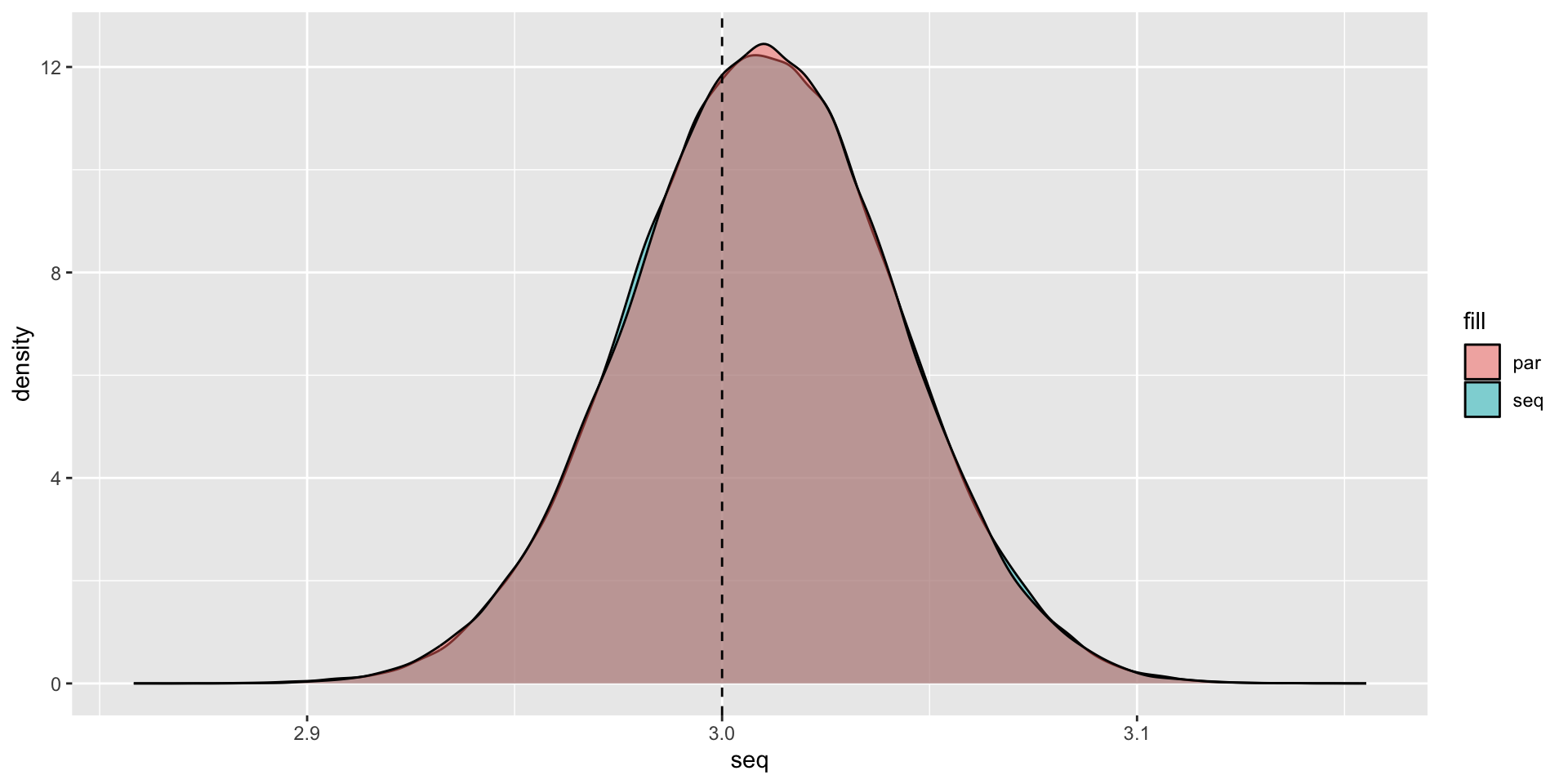
Packages that are already parallelized
A lot of speed performance from packages are from parallel processing.
data.table 1.17.0 using 5 threads (see ?getDTthreads). Latest news: r-datatable.comThis means that adding parallelization on top of data.table operations may not speed things up.
The fixest package also already parallelizes code for multiple fixed effect regressions.
So you have to be careful when paralleizing code that is already optimized.
Parallelization on OSCAR
We will run this on Brown’s OSCAR cluster in the OSCAR guest lecture on 3/15.
renv::install(c("tibble", "tictoc", "furrr"), prompt = FALSE)
library(tibble)
library(tictoc)
library(furrr)
availableCores()
n = 1e3 ## One thousand observations
set.seed(42)
data <- tibble::tibble(
  x = rnorm(n),
  y = 4 + 3 * x + rnorm(n)
)
bootstrap <- function(data, n_boot = 1e3) {
  boot_data <- data[sample(nrow(data), size = n_boot, replace = TRUE), ]
  m <- lm(y ~ x, data = boot_data)
  slope <- coef(m)[[2]]
  return(slope)
}
plan(multicore)
tic()
slopes_par <- future_map_dbl(1:1e5, ~ bootstrap(data), .options = furrr_options(seed = 42L))
toc()
plan(sequential)
tic()
slopes_par <- future_map_dbl(1:1e5, ~ bootstrap(data), .options = furrr_options(seed = 42L))
toc()Live Coding Example
Live Coding Example
Speed Comparison:
library(data.table)
library(dplyr)
library(tictoc)

nrows <- 1e7 # 10 million rows

dt <- data.table(
  id    = sample(letters, nrows, replace = TRUE),
  group = sample(1:100, nrows, replace = TRUE),
  value = rnorm(nrows)
)

tb <- tibble(
  id    = dt$id,
  group = dt$group,
  value = dt$value
)

tic("data.table")
dt[group == 1, value := 0]
toc()

tic("dplyr")
tb <- tb |> mutate(value = if_else(group == 1, 0, value))
toc()

dt2 <- copy(dt)
setkey(dt2, "group")

tic("data.table grouped")
dt2[group == 1, value := 0]
toc()