[1] 8R Functions & Regressions
Writing functions, organizing code, and running regressions
Brendan Chapuis
February 24, 2027
Today
- Functions: writing your own, arguments and defaults, scope, anonymous functions.
purrr::map(): apply a function to every element of a vector or list.- Regressions:
lm(), tidy results withbroom, robust standard errors withestimatr, and fixed effects withfixest. - Many regressions with
map(): one model per group, in a few lines. - Organizing code: when to write a function, and where to put it.
Functions
Functions
Functions…
take input(s)
do something
return an ouput
R is a Functional Language
R, at its heart, is a functional programming (FP) language. This means that it provides many tools for the creation and manipulation of functions. In particular, R has what’s known as first class functions. You can do anything with functions that you can do with vectors: you can assign them to variables, store them in lists, pass them as arguments to other functions, create them inside functions, and even return them as the result of a function. Hadley Wickham, Advanced R
Why use functions?
Functions make your code:
more flexible
less repetitive
more readable (potentially)
A Basic Function
Here is a basic, if not exciting, function:
- Take inputs
- Do something
- Return output
Syntax
Functions are always declared using the function function(),
followed by curly braces { } which demark what the function actually does.
Most functions will end with a return() call, though this is not strictly required.
“Degenerate” functions
Which is just to show that technically inputs and outputs are not necessary.
Variable Scope
Functions have their own “environment” for variables.
[1] "Outside function"Even if we call our function, the value for cubed is not overwritten in our R session environment.
Breaking Function Scope
<<- breaks the scope of a function and affects vaiables outside
[1] 27[1] 27But this is a really bad idea.
You should only allow functions to affect your session by returning values.
Otherwise, it is very confusing to tell what is changing a variable.
Limiting Function Scope
Technically, you can use a variable defined outside a function inside a function.
But this is also a bad idea.
Functions are meant to be flexible and portable
By relying on a session variable we’ve made this function dependent on the current setting.
Adding Additional Arguments
Instead, we should pass beta as an additional argument for our function.
Setting a Default Argument
When declaring a function, you can set a default value for an argument.
That default value will be used unless you specify a new value to overwrite it.
Ordering of Arguments
Functions assume unlabelled arguments are given in the order they were declared.
i.e. the first argument is our consumption value, and the second is our beta.
You can always be explicit about function arguments as well.
CRRA Utility
Let’s declare a CRRA utility function,
\[ U(C) = \beta \frac{C^{1-\gamma}}{1-\gamma} \]
In our code, this looks like
CRRA Utility
Let’s declare a CRRA utility function,
\[ U(C) = \beta \frac{C^{1-\gamma}}{1-\gamma} \]
What happens if we run when gamma = 1?
If you paid attention in Macro, then you know that CRRA utility with \(\gamma \rightarrow 1\) converges to log utility.
If-Else Statements within Functions
We can implement this with an if-else statement within our function.
Now our function works in both cases:
Printing out a function
We can always inspect the actual code for a function by calling it without the parentheses ().
Printing out a function
This works for functions from other packages too.
function (x, n = 1L, default = NULL, order_by = NULL, ...)
{
    if (inherits(x, "ts")) {
        abort("`x` must be a vector, not a <ts>, do you want `stats::lag()`?")
    }
    check_dots_empty0(...)
    check_number_whole(n)
    if (n < 0L) {
        abort("`n` must be positive.")
    }
    shift(x, n = n, default = default, order_by = order_by)
}
<bytecode: 0x760ab94a88>
<environment: namespace:dplyr>
Anonymous Functions
Anonymous functions are functions that do not have a name.

Anonymous Functions
Anonymous functions are functions that do not have a name.
This means they are not stored as a variable that you can use over again, but exist only for a moment.
For functions that only take one line, you can drop the curly brackets.
When would we use this?
purrr::map() family
Map Family of Functions
We saw briefly the *apply() family of base R functions (when we were looking at loops).
The map() family is the tidyverse equivalent and are nicer to use.
Map Function
The map() function always
- takes a vector (or list) for input
- calls a function on each element
- returns a list as the result
Using an Anonymous Function with map()
This is an example where we may want to declare an anonymous function.
Using an Anonymous Function with map()
And again, because our function is only one line, we could drop the curly braces.
Multiline Anonymous Functions
Conversely, you could have a multiline anonymous function.
Multiline Anonymous Functions
[[1]]
      mpg             cyl             disp
 Min.   :10.40   Min.   :4.000   Min.   : 71.1
 1st Qu.:15.43   1st Qu.:4.000   1st Qu.:120.8
 Median :19.20   Median :6.000   Median :196.3
 Mean   :20.09   Mean   :6.188   Mean   :230.7
 3rd Qu.:22.80   3rd Qu.:8.000   3rd Qu.:326.0
 Max.   :33.90   Max.   :8.000   Max.   :472.0

[[2]]
  Sepal.Length    Sepal.Width     Petal.Length
 Min.   :4.300   Min.   :2.000   Min.   :1.000
 1st Qu.:5.100   1st Qu.:2.800   1st Qu.:1.600
 Median :5.800   Median :3.000   Median :4.350
 Mean   :5.843   Mean   :3.057   Mean   :3.758
 3rd Qu.:6.400   3rd Qu.:3.300   3rd Qu.:5.100
 Max.   :7.900   Max.   :4.400   Max.   :6.900
map Return Types
By default, map() will always return a list.
It does not know the datatype of the objects you are returning,
- and a list works with any data type and with a mix of data types.
If you do know your datatype, you could use…
map_lgl()map_int()map_dbl()map_chr()
- Which will all return a vector of that data type.
Example with map_dbl()
Using our prior map example,
Example with fredr package
We saw before that map() was convenient for working with fredr package.
This map function returns data.frames (tibbles) and then list_rbind combines them by rbind-ing them.
rbind()takes two data.frames and stacks them on top of each othercbind()takes two data.frames and stacks them beside one another
Regressions
From Functions to Regressions
So far we have written functions and applied them to many inputs with map().
For the rest of the map() story, we need something worth repeating. In economics, that is usually a regression.
- Run one regression and read its results
- Get robust and clustered standard errors
- Add fixed effects
- Then run many regressions at once with
map()
Regressions
The workhorse of economics research is linear regression.
The simplest form is \[ Y = \beta X + \epsilon \]
Given a set of values for \(Y\) and \(X\), we can estimate \(\hat{\beta}\).
Generating some example data
# A tibble: 100 × 2
         x     y
     <dbl> <dbl>
 1  2.30   40.2
 2  5.34    6.83
 3  2.04   19.3
 4  9.92   51.3
 5 10.7    71.5
 6  2.96   10.2
 7  1.91   26.3
 8 10.6    18.2
 9  0.0465 34.0
10  7.46   54.6
# ℹ 90 more rows
We know the true \(\beta\) is 5.
Estimating \(\beta\)
R has a built-in function for linear models: lm().
Call:
lm(formula = y ~ x, data = tb)

Coefficients:
(Intercept)            x
      4.633        4.100
Printing the model returns only a few pieces of information, but there’s much more stored within.
summary() for detailed information
Call:
lm(formula = y ~ x, data = tb)

Residuals:
    Min      1Q  Median      3Q     Max
-39.971 -14.708  -0.024  13.895  42.721

Coefficients:
            Estimate Std. Error t value Pr(>|t|)
(Intercept)    4.633      3.939   1.176    0.242
x              4.100      0.643   6.377 5.97e-09 ***
---
Signif. codes:  0 '***' 0.001 '**' 0.01 '*' 0.05 '.' 0.1 ' ' 1

Residual standard error: 18.85 on 98 degrees of freedom
Multiple R-squared:  0.2932,    Adjusted R-squared:  0.286
F-statistic: 40.66 on 1 and 98 DF,  p-value: 5.973e-09
Structure of lm() models
An lm object is just a big list.
 [1] "coefficients"  "residuals"     "effects"       "rank"
 [5] "fitted.values" "assign"        "qr"            "df.residual"
[9] "xlevels" "call" "terms" "model" Tidying model results with broom
broom turns model results into tibbles.
# A tibble: 2 × 5
  term        estimate std.error statistic       p.value
  <chr>          <dbl>     <dbl>     <dbl>         <dbl>
1 (Intercept)     4.63     3.94       1.18 0.242
2 x 4.10 0.643 6.38 0.00000000597broom creates standardized results from many models across many packages, including the ones we use next.
Robust Standard Errors
Robust Standard Errors
You should almost always report robust standard errors.
Two packages that support this in R:
Robust SE with estimatr
Same point estimates, slightly different standard errors.
# A tibble: 2 × 5
  term        estimate std.error statistic       p.value
  <chr>          <dbl>     <dbl>     <dbl>         <dbl>
1 (Intercept)     4.63     3.94       1.18 0.242
2 x 4.10 0.643 6.38 0.00000000597# A tibble: 2 × 9
term estimate std.error statistic p.value conf.low conf.high df outcome
<chr> <dbl> <dbl> <dbl> <dbl> <dbl> <dbl> <dbl> <chr>
1 (Interc… 4.63 4.07 1.14 2.57e-1 -3.44 12.7 98 y
2 x 4.10 0.625 6.56 2.57e-9 2.86 5.34 98 y Changing the SE type
estimatr defaults to “HC2” robust standard errors. There are options for “HC0”, “HC1”, and “HC3”.
To match the robust SEs reported in Stata, use “HC1” or “stata”:
You can read more about the math for each type here.
Panel Regressions with fixest
Panel Regressions
Panel data has at least two dimensions:
- time
- groups (countries, states, people)
Panel regressions usually need:
- Fixed effects
- Clustered standard errors
Example Panel Data
The gapminder package has country-level data every five years.
# A tibble: 1,704 × 6
   country     continent  year lifeExp   pop gdpPercap
   <fct>       <fct>     <int>   <dbl> <dbl>     <dbl>
 1 Afghanistan Asia       1952    28.8  8.43     0.779
 2 Afghanistan Asia       1957    30.3  9.24     0.821
 3 Afghanistan Asia       1962    32.0 10.3      0.853
 4 Afghanistan Asia       1967    34.0 11.5      0.836
 5 Afghanistan Asia       1972    36.1 13.1      0.740
 6 Afghanistan Asia       1977    38.4 14.9      0.786
 7 Afghanistan Asia       1982    39.9 12.9      0.978
 8 Afghanistan Asia       1987    40.8 13.9      0.852
 9 Afghanistan Asia       1992    41.7 16.3      0.649
10 Afghanistan Asia       1997    41.8 22.2      0.635
# ℹ 1,694 more rows
Running OLS with fixest
Let’s predict life expectancy using GDP per capita (in thousands).
OLS estimation, Dep. Var.: lifeExp
Observations: 1,704
Standard-errors: IID
             Estimate Std. Error  t value  Pr(>|t|)
(Intercept) 53.955561   0.314995 171.2902 < 2.2e-16 ***
gdpPercap    0.764883   0.025790  29.6577 < 2.2e-16 ***
---
Signif. codes:  0 '***' 0.001 '**' 0.01 '*' 0.05 '.' 0.1 ' ' 1
RMSE: 10.5   Adj. R2: 0.340326
We could have estimated this with lm() or lm_robust() too.
Adding fixed effects
Fixed effects go after a |.
OLS estimation, Dep. Var.: lifeExp
Observations: 1,704
Fixed-effects: continent: 5
Standard-errors: IID
          Estimate Std. Error t value  Pr(>|t|)
gdpPercap  0.44527   0.023498 18.9493 < 2.2e-16 ***
---
Signif. codes:  0 '***' 0.001 '**' 0.01 '*' 0.05 '.' 0.1 ' ' 1
RMSE: 8.37531     Adj. R2: 0.578106
                Within R2: 0.174557
Since fixest 0.13, the default standard errors are iid. Older versions clustered by the first fixed effect, so check which one you are getting.
Clustering standard errors
Use the cluster argument (or vcov) to cluster.
OLS estimation, Dep. Var.: lifeExp
Observations: 1,704
Fixed-effects: continent: 5
Standard-errors: Clustered (country)
          Estimate Std. Error t value  Pr(>|t|)
gdpPercap  0.44527   0.158608 2.80737 0.0057027 **
---
Signif. codes:  0 '***' 0.001 '**' 0.01 '*' 0.05 '.' 0.1 ' ' 1
RMSE: 8.37531     Adj. R2: 0.578106
                Within R2: 0.174557
When should you cluster, and on what? See When Should You Adjust Standard Errors for Clustering? (Abadie, Athey, Imbens, Wooldridge 2017).
Other standard errors
The vcov argument also takes "iid", "hetero" (robust), or a clustering formula.
m_cl2 is the same model as m_cl.
Multiple fixed effects
Add fixed effects with the same syntax as adding regressors.
OLS estimation, Dep. Var.: lifeExp
Observations: 1,704
Fixed-effects: country: 142,  year: 12
Standard-errors: Clustered (country)
           Estimate Std. Error  t value Pr(>|t|)
gdpPercap -0.078017   0.035318 -2.20895 0.028792 *
---
Signif. codes:  0 '***' 0.001 '**' 0.01 '*' 0.05 '.' 0.1 ' ' 1
RMSE: 3.27866     Adj. R2: 0.929173
                Within R2: 0.011428
Comparing models
etable() prints several models side by side: pooled OLS, continent fixed effects with clustered SEs, and two-way fixed effects.
                             m_ols              m_cl             m_2fe
Dependent Var.:            lifeExp           lifeExp           lifeExp

Constant         53.96*** (0.3150)
gdpPercap       0.7649*** (0.0258) 0.4453** (0.1586) -0.0780* (0.0353)
Fixed-Effects:  ------------------ ----------------- -----------------
continent                       No               Yes                No
country                         No                No               Yes
year                            No                No               Yes
_______________ __________________ _________________ _________________
S.E. type                      IID       by: country       by: country
Observations                 1,704             1,704             1,704
R2                         0.34071           0.57934           0.93554
Within R2                       --           0.17456           0.01143
---
Signif. codes: 0 '***' 0.001 '**' 0.01 '*' 0.05 '.' 0.1 ' ' 1
Speed Comparison: fixest and Stata’s reghdfe
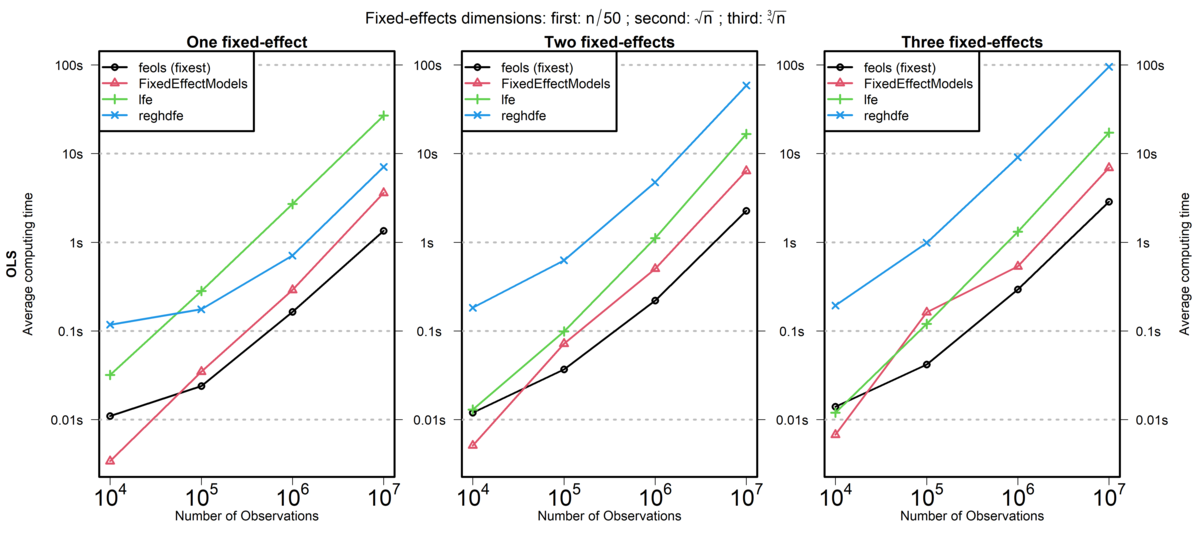
lfe is another R package, reghdfe is a Stata package, and FixedEffectModels is a Julia package.
Source: fixest documentation (comparison run in 2020)
Many Regressions with map()
The payoff for map()
Earlier we used map() to apply a function to each element of a vector or list.
Now suppose we want to run the same regression on each group in our data.
- The function:
\(d) lm(y ~ x, data = d) - The list: one dataset per group
map()runs the function on every element
All we need is a way to store “one dataset per group” in a tibble.
Subsets of data
Add a group to our simulated data.
# A tibble: 3 × 2
  group     n
  <chr> <int>
1 A        29
2 B        37
3 C        34
We could filter the data and call lm() three times. That is the repetition map() is for.
Nesting tibbles
nest() turns the tibble into one row per group.
# A tibble: 3 × 2
  group data
  <chr> <list>
1 A     <tibble [29 × 2]>
2 B     <tibble [37 × 2]>
3 C     <tibble [34 × 2]>
The data column is a list of tibbles: each group’s data is stored in one row of the parent tibble.
Running lm on nested tibbles
map() runs a function on each element of the data column, so we get a column of models.
# A tibble: 3 × 4
  group data              model  results
  <chr> <list>            <list> <list>
1 A     <tibble [29 × 2]> <lm>   <tibble [2 × 5]>
2 B     <tibble [37 × 2]> <lm>   <tibble [2 × 5]>
3 C     <tibble [34 × 2]> <lm>   <tibble [2 × 5]>
A second map() applies tidy() to each model: a column of tidy results.
Unnesting a tibble
# A tibble: 6 × 6
  group term        estimate std.error statistic  p.value
  <chr> <chr>          <dbl>     <dbl>     <dbl>    <dbl>
1 A     (Intercept)     5.42      7.90     0.686 0.499
2 B     (Intercept)     5.33      6.92     0.770 0.447
3 C     (Intercept)     3.88      6.36     0.609 0.547
4 A     x               3.74      1.38     2.72  0.0113
5 B     x               4.10      1.05     3.89  0.000432
6 C     x               4.27      1.07     4.00  0.000354
We can now easily compare each group’s estimate of \(\beta\).
Nesting Summary
Pros
- A clean way to estimate many models
- Makes full use of
tidyversefunctions - Easy to add more models or different subsets
Cons
- Duplicates data for each row, which is costly for large datasets
Next class: plotting the results
The unnested results are just a tibble, so next class we will plot them with ggplot2 as coefficient plots.
Back to Functions
When Should You Use a Function?
Rule of Three
- When you duplicate some code three times, you should write it as a function.
This is obviously a rule-of-thumb, but it’s a useful starting point.
You should also consider for your projects,
- will I need to iterate over this step?
- will I need to run robustness checks on this step?
Where Do You Write a Function?
A function has to be declared before you can use it.
So the simplest spot to put them is at the top of your R script.
But this can get overcrowded very quickly.
Sourcing Helper Scripts
A better solution is to store your functions in their own separate scripts.
Then you source() them into the main script, or wherever you need them.
Creating an R Package
Another option is to create an R package for your functions.
This allows you to:
- share your functions with others
- reuse your functions across multiple projects
- add documentation
- add unit tests
You will create a simple test package as part of your homework assignment.
Summary
- Functions take inputs, do something, and return an output. Pass everything they need as arguments.
map()applies a function to every element of a list.map_dbl()and friends return vectors.lm(),lm_robust(), andfeols()estimate regressions;tidy()turns any of them into a tibble.nest()+map()+unnest()runs the same regression on every group.- Write a function when you repeat yourself; keep functions in a helper script you
source().